Tech
Wayback Machine: A Complete Guide to Exploring the History of the Web

The Wayback Machine is one of the most useful tools for exploring the history of the internet. Websites change constantly, pages disappear, businesses rebrand, and online content can be edited or removed without warning. When you need to understand what a website looked like in the past, the Wayback Machine can provide a valuable window into earlier versions of the web.
Created as an internet archiving project, the Wayback Machine allows people to search for archived versions of websites and explore pages that may no longer exist in their original form. It is useful for researchers, journalists, students, marketers, website owners, developers, and ordinary internet users who simply want to see how an old website looked.
What makes the Wayback Machine particularly interesting is that it is more than a simple website history viewer. It represents a large effort to preserve digital information for future generations. Since websites are frequently updated or removed, web archives can help maintain access to information that might otherwise disappear.
What Is the Wayback Machine?

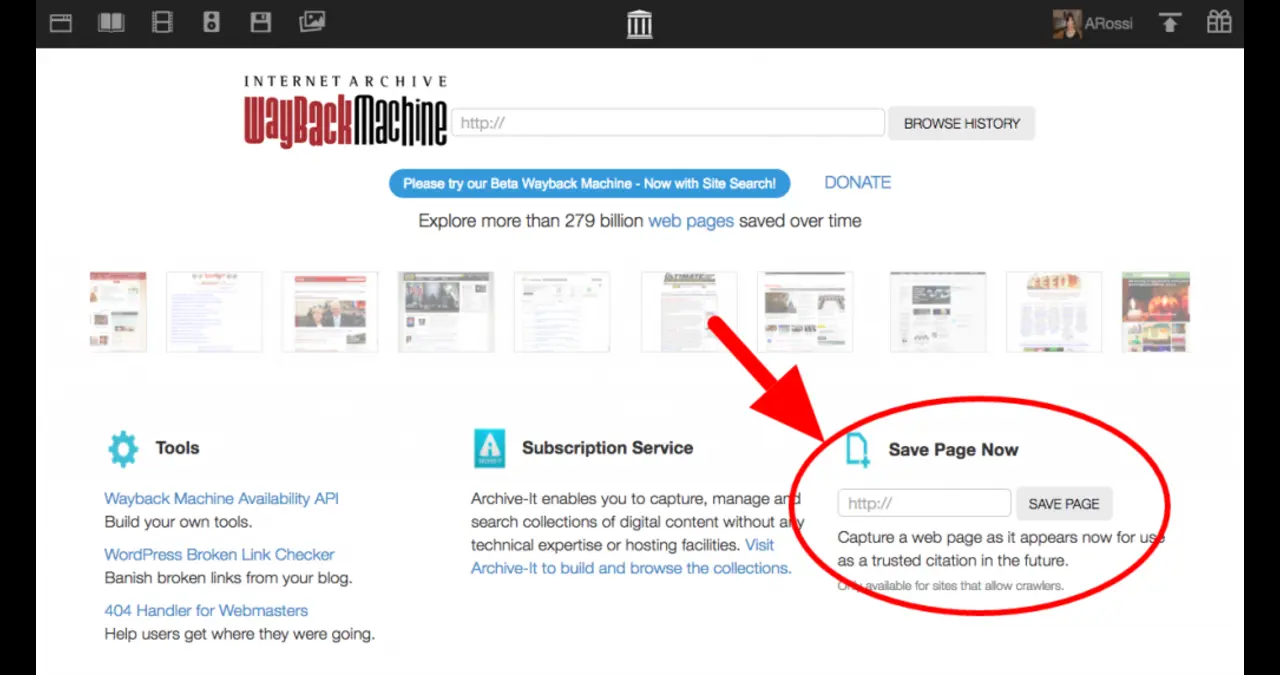
The Wayback Machine is a digital archive that lets users view previously captured versions of websites. It is operated by the Internet Archive, a nonprofit organization dedicated to preserving digital and cultural materials. Instead of showing only the current version of a website, the Wayback Machine can show snapshots captured at different points in the site’s history.
When you enter a website address into the Wayback Machine, you may find a timeline or calendar containing available captures. Selecting an archived capture can open an older version of the page. Depending on how the page was archived, you may be able to navigate through different sections of the historical website.
The archive does not contain a perfect copy of every website ever published. Some pages may have missing images, broken links, incomplete scripts, or unavailable resources. Even with those limitations, the Wayback Machine remains an important resource for examining how websites and online information have changed over time.
How the Wayback Machine Works
The Wayback Machine collects archived web pages through automated crawling, user submissions, and other preservation activities. When a webpage is captured, information about that page can be stored so that users can access an archived representation later.
A web crawler can discover pages by following links across websites. When a page is captured, its available resources may also be archived. However, modern websites can rely heavily on JavaScript, external services, dynamic databases, and other technologies that make complete archival preservation difficult.
This means an archived page may not behave exactly like the original website. A simple article may appear almost unchanged, while an interactive application might only partially function. The quality of an archived capture depends on what was successfully collected when the page was preserved.
Why the Wayback Machine Is Important
The modern internet changes extremely quickly. A website that exists today might be redesigned tomorrow, while an important article could be edited or removed later. The Wayback Machine helps create a historical record of this changing environment.
For researchers, archived pages can provide useful evidence about how information was presented at a particular time. Journalists may use archived websites when investigating historical claims, while academics can examine how organizations, publications, and online communities evolved.
The Wayback Machine can also be useful for everyday internet users. Someone might remember an old website, product page, article, or online project but discover that the original page has disappeared. Searching its archived history can sometimes reveal the information that is no longer available on the live web.
How to Search the Wayback Machine
Using the Wayback Machine is generally straightforward. Start by entering the website address you want to investigate. The archive will show whether it has captured versions of that address.
If captures are available, you can browse the historical record and select an archived page. Older captures can sometimes reveal previous designs, articles, navigation menus, product information, contact details, or other publicly available material.
Searching works best when you use the exact web address you are interested in. If the specific page does not appear, searching the main domain can sometimes reveal related archived pages. You can then explore links within the archived website to locate other historical content.
Exploring Old Website Designs
One of the most enjoyable uses of the Wayback Machine is discovering how websites looked in the past. Popular websites often go through many redesigns as technology and user expectations change.
An older website may have a completely different layout, typography, navigation system, logo, or color scheme compared with its current version. Looking at these changes can provide an interesting view of how web design has evolved.
Designers can also use the Wayback Machine as a source of inspiration and research. Examining previous versions of websites can help explain why certain layouts changed and how organizations adapted their online presence over time.
The Wayback Machine for Research
Researchers can use the Wayback Machine to investigate historical online information. This can be particularly useful when a source has changed since it was originally published.
For example, a researcher studying an organization may want to understand how its website described its services in the past. An archived capture can provide context that is not visible on the current website.
However, archived information should still be evaluated carefully. An archived webpage shows what was captured, but it does not automatically establish that every statement on the page was accurate. Researchers should consider the source, date, context, and reliability of the original material.
The Wayback Machine for Journalists
Journalists often work with information that changes quickly. A company website might remove a statement, replace an announcement, or redesign an important page. The Wayback Machine can sometimes help journalists locate earlier versions of publicly accessible information.
Archived pages can also provide historical context when reporting on organizations, products, public statements, and online events. Instead of relying solely on someone’s recollection of what a website previously said, journalists may be able to inspect an archived version.
It is still important to verify important claims through multiple sources. An archived webpage should be treated as one piece of evidence rather than automatically being considered the complete story.
The Wayback Machine for SEO Professionals
The Wayback Machine can also be useful for search engine optimization professionals. Website owners frequently change URLs, content structures, navigation systems, and page templates. Historical captures can help SEO specialists understand what existed before a redesign.
For example, an SEO professional might investigate an old version of a website to understand whether an important page previously existed. Archived captures can also help identify older content structures, historical branding, and previous navigation patterns.
This historical information can be especially useful during website migrations. If traffic or visibility changes after a redesign, reviewing archived versions can help provide context about what changed. The archive does not provide search engine ranking data by itself, but it can preserve useful information about historical website content.
Finding Deleted or Changed Content
One of the most common reasons people visit the Wayback Machine is to look for content that has disappeared. A page may have been deleted from the live website while an older capture remains available.
This can be useful when someone needs to revisit an old article, product description, announcement, or webpage. However, availability is not guaranteed. A page may never have been captured, or its archived version may be incomplete.
The Wayback Machine should therefore be viewed as a historical archive rather than a guaranteed backup service. If something important needs to be preserved, relying exclusively on the archive may not be appropriate.
Understanding Archived Links
Archived websites can contain links that behave differently from links on a live website. When you open a link inside an archived page, the Wayback Machine may attempt to locate an archived version of the destination.
If that destination was captured, you may be able to continue browsing the historical website. If it was not captured, the link may lead to an unavailable page or another version of the resource.
This is one reason why exploring an archived website can feel different from visiting the original site. The archive reconstructs available historical material rather than recreating the entire internet exactly as it existed.
Why Some Pages Do Not Appear
Not every webpage is available through the Wayback Machine. There are several possible reasons for this.
A crawler may never have discovered the page, the page may have been difficult to archive, or technical restrictions may have prevented successful collection. Dynamic content can also be challenging because some information is generated only after a user interacts with the website.
In some cases, an archived page may exist but appear incomplete. Images, videos, scripts, fonts, forms, or other external resources may not load correctly. This does not necessarily mean the archive is malfunctioning; it can reflect limitations in preserving complex modern websites.
The Wayback Machine and Website Owners
Website owners should understand that publishing information publicly does not necessarily mean the page will remain under their control forever. Archived copies may exist even after the live version has changed.
For businesses, this can be an important consideration when updating websites. Historical versions can reveal older branding, product information, policies, marketing language, and other public material.
Website owners should also understand the archive’s policies and preservation mechanisms. If there are concerns about archived material, the appropriate process should be investigated directly through the Internet Archive rather than assuming that removing a live page automatically removes historical captures.
Using the Wayback Machine for Competitor Research
The Wayback Machine can provide historical context for competitor research. Businesses can examine how a competitor’s public website has evolved, including changes to navigation, messaging, service descriptions, and branding.
This type of research is most useful when it focuses on publicly available information and historical development rather than attempting to access private or restricted material.
Looking at several historical captures can reveal whether a company has gradually changed its positioning or completely redesigned its online presence. The findings can help businesses understand broader changes in their market without relying only on the current appearance of competing websites.
The Wayback Machine for Website Recovery
Sometimes a website owner loses access to old content after a redesign, migration, hosting problem, or accidental deletion. The Wayback Machine may contain copies of some publicly accessible pages.
Archived material can sometimes help identify old text, page structures, images, URLs, and other information. It may not provide everything needed to rebuild a website, but it can serve as a useful reference.
Recovery should therefore be approached carefully. An archived webpage is not necessarily equivalent to a complete website backup, particularly when the original site relied on databases, user accounts, dynamic applications, or external services.
Limitations of the Wayback Machine
The Wayback Machine is powerful, but it has limitations. Its archive is not a perfect historical copy of the web. Some pages are missing, some captures are incomplete, and certain interactive features may not work.
Another important limitation is timing. A website may have changed shortly before or after a capture. If you need to understand exactly when something changed, multiple captures may need to be examined.
Archived content can also lack context. A webpage alone may not explain why an organization changed its messaging or why a particular page disappeared. Additional sources may be necessary for a complete understanding.
Is the Wayback Machine Reliable?
The Wayback Machine can be a valuable source for historical web research, but reliability depends on what you are trying to establish. It can show that a particular archived representation of a webpage existed, assuming the capture is authentic and accessible.
That does not automatically prove that every statement on the archived page was true. The archive preserves information; it does not independently verify all claims made by website publishers.
For important research, the best approach is to compare archived material with other reliable sources. This creates a stronger understanding of what happened and reduces the risk of interpreting an incomplete capture as the full historical record.
Wayback Machine and Digital Preservation
Digital preservation is increasingly important because online information can disappear very easily. Printed books and physical documents can remain accessible for decades, but websites can vanish when hosting expires, organizations close, or domains are abandoned.
The Wayback Machine contributes to digital preservation by keeping historical representations of publicly accessible web content. This helps researchers and future generations study how the internet developed.
Preserving the web is also important for understanding cultural history. Websites reflect how people communicate, shop, learn, publish news, build communities, and share ideas. Historical web archives can therefore become valuable records of everyday digital life.
Tips for Getting Better Results
When using the Wayback Machine, start with the exact page address whenever possible. If the page is unavailable, try the main domain or a related URL. Different versions of the same content may have been archived under different addresses.
It is also helpful to inspect several captures rather than relying on a single snapshot. A single capture can provide only a limited view, while multiple captures can reveal how a page changed.
If images or other resources are missing, try opening the archived page through different captures. Another capture may have preserved more of the original content.
The Future of Web Archives
The web continues to become more complicated. Modern websites increasingly rely on interactive applications, streaming services, client-side rendering, and third-party platforms. These technologies create new challenges for digital preservation.
Despite those challenges, the need for web archives remains strong. As more of human communication moves online, preserving historical digital information becomes increasingly important.
The Wayback Machine is likely to remain valuable because it provides something that ordinary browsing cannot: a way to look backward at the web. It helps turn an constantly changing online environment into a historical record that can be explored.
Final Thoughts on the Wayback Machine
The Wayback Machine is much more than a tool for looking at old website designs. It is a valuable resource for exploring the history of online information, researching previous versions of webpages, understanding website changes, and investigating digital history.
Whether you are a student researching an old source, a journalist checking historical web content, an SEO professional examining a previous website structure, or simply someone curious about an old webpage, the Wayback Machine can provide useful context.
Its limitations are worth remembering. Not every page has been archived, captures can be incomplete, and historical content should be interpreted carefully. Even so, the Wayback Machine remains one of the most interesting ways to explore the changing history of the internet and discover information that may no longer be visible on today’s web.
Conclusion
The Wayback Machine is a valuable resource for exploring the history of the internet and discovering how websites have changed over time. From researching older webpages to checking previous website designs, it gives users an opportunity to explore online information that may no longer be available on the live web.
Whether you are a researcher, journalist, SEO professional, website owner, student, or simply curious about an old website, the Wayback Machine can provide useful historical context. While it does not archive every webpage perfectly and some captures may be incomplete, it remains an important tool for digital preservation and web research.
FAQs
What is the Wayback Machine?
The Wayback Machine is an online digital archive operated by the Internet Archive. It allows users to view available archived versions of websites and explore how webpages appeared in the past.
Can I use the Wayback Machine to find deleted webpages?
Yes, you can sometimes find deleted webpages through the Wayback Machine if the page was captured before it disappeared. However, not every webpage has an archived version, and some captures may be incomplete.
Is everything on the Wayback Machine available?
No. The Wayback Machine does not contain a complete copy of the entire internet. Some websites or pages may have no captures, while others may have missing images, files, scripts, or interactive features.
Can the Wayback Machine help with SEO research?
Yes. SEO professionals can use the Wayback Machine to examine historical website structures, content, URLs, navigation, branding, and other publicly visible changes. This can be particularly useful when investigating website redesigns or content changes.
Is the Wayback Machine free to use?
The Wayback Machine is generally available to the public for searching and viewing archived webpages. Users can visit the service online and search for websites they want to investigate.
YOU MAY READ ALSO